Part 1 of the Ultimate MT5 Tutorial Series
Introduction
If you’ve spent any time in the world of online trading, you’ve almost certainly heard of MetaTrader. For over a decade, MetaTrader 4 (MT4) stood as the undisputed king of retail trading platforms. But the trading world evolves — and so did MetaTrader. Enter MetaTrader 5 (MT5): a more powerful, more versatile, and more modern platform designed to meet the demands of today’s traders across multiple financial markets.
In this first article of our MT5 tutorial series, we’ll cover what MT5 is, how it differs from its predecessor, and — most importantly — why you should consider using it for your trading journey.
What is MetaTrader 5?
MetaTrader 5 is a multi-asset electronic trading platform developed by MetaQuotes Software. It was officially released in 2010 as the successor to MetaTrader 4, and it was built from the ground up — not just an upgrade, but a complete redesign of the trading ecosystem.
MT5 is used by millions of traders and is offered by hundreds of brokers worldwide. It supports trading in:
Forex (currency pairs)
Stocks and equities
Commodities (gold, oil, etc.)
Futures and options
Cryptocurrencies (depending on your broker)
This multi-asset nature is one of MT5’s biggest differentiators. While MT4 was essentially built for Forex, MT5 was designed to be a universal trading platform.
MT5 vs MT4: The Key Differences
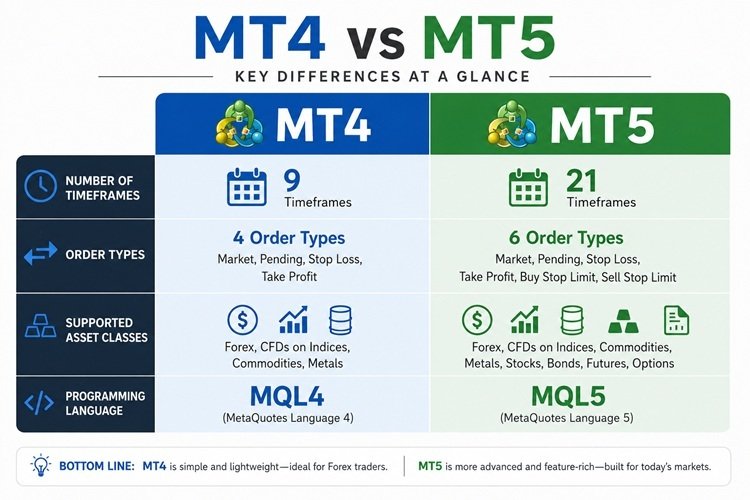
Many traders ask: “If MT4 works fine, why switch?” It’s a fair question. Here’s a breakdown of the most meaningful differences:
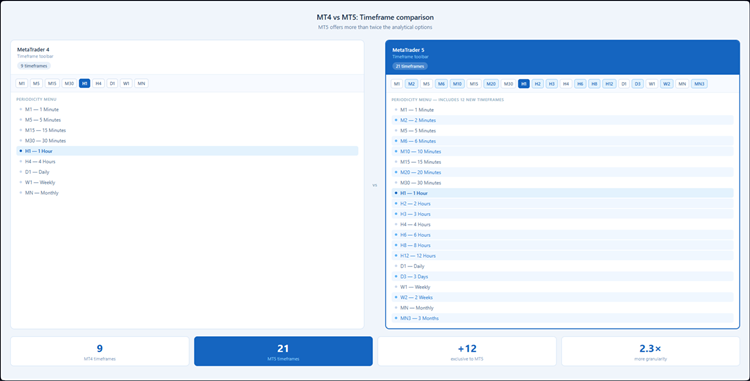
1. More Timeframes
MT4 offers 9 chart timeframes. MT5 gives you 21 timeframes, from M1 (1 minute) all the way up to MN (monthly), giving you much finer control over your technical analysis.
2. More Order Types
MT5 introduces two additional pending order types — Buy Stop Limit and Sell Stop Limit — giving traders greater precision in execution strategies.
3. A More Powerful Programming Language: MQL5
MT5 uses MQL5, an object-oriented language that is significantly more powerful than MT4’s MQL4. It allows developers to build more sophisticated Expert Advisors (EAs), custom indicators, and scripts.
4. Built-in Economic Calendar
MT5 includes a native economic calendar directly inside the platform, so you can track market-moving events without switching between tools.
5. Depth of Market (DOM)
MT5 offers a Level II pricing view (Depth of Market), which shows the full order book — a feature especially useful for stock and futures traders.
6. Faster Backtesting
MT5’s strategy tester supports multi-threaded optimization and multi-currency backtesting, making it dramatically faster than MT4 for testing automated strategies.
The MT5 Interface at a Glance
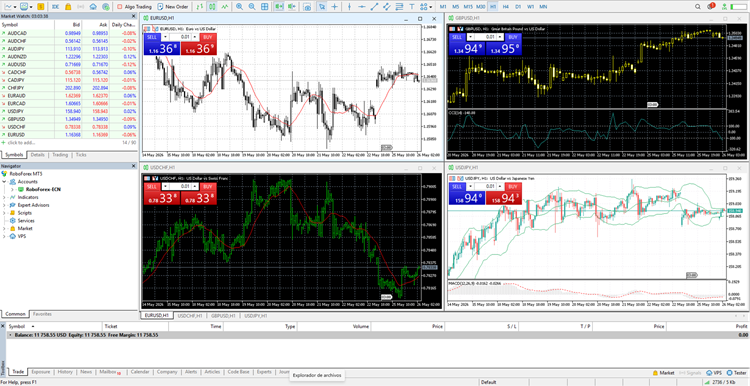
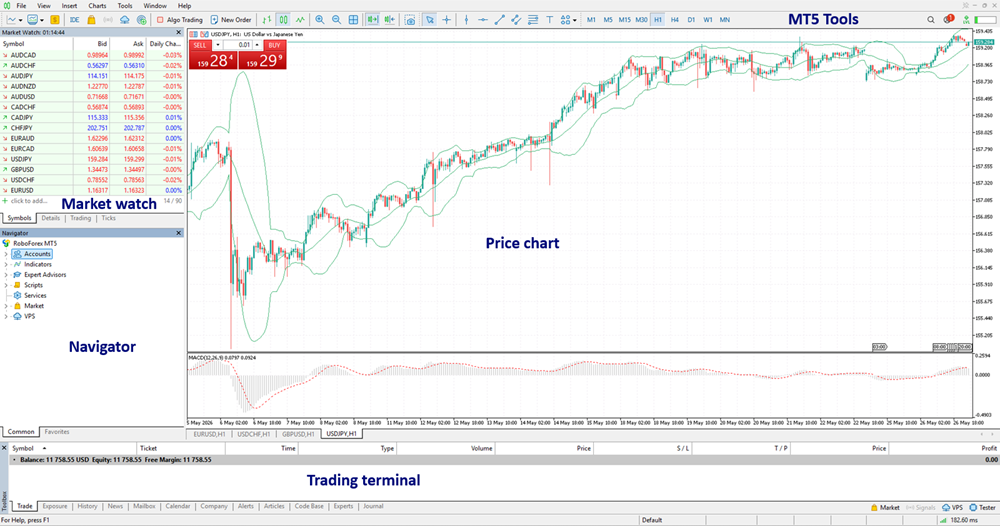
When you first open MT5, you’ll see several key components:
Market Watch — A panel listing all available trading instruments and their live bid/ask prices.
Navigator — A tree-style browser for your accounts, Expert Advisors, custom indicators, and scripts.
Chart Window — The main area where price charts are displayed. You can open multiple charts simultaneously.
Terminal — The bottom panel showing your open trades, account history, alerts, and journal logs.
Toolbox — Houses the built-in economic calendar, trading signals, and the MQL5 community marketplace.
Why Use MetaTrader 5?
Beyond the technical upgrades, here’s why MT5 makes sense for a wide variety of traders:
- For beginner traders: MT5 is free to download and use. Your broker provides the server connection, so there are no subscription fees. The interface is logical once you learn it, and there is an enormous global community of tutorials, forums, and resources.
- For technical analysts: With 38 built-in technical indicators, 44 graphical objects, and 21 timeframes, MT5 is one of the most richly equipped charting environments available at no cost.
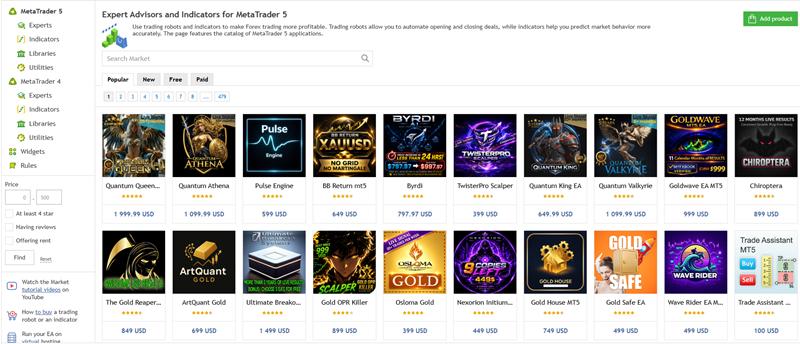
- For algo traders and developers: MQL5 is a mature, well-documented language with a large community marketplace (the MQL5 Market) where you can buy, sell, or rent automated strategies and indicators.
- For multi-asset traders: If you want to trade Forex in the morning and stocks or futures in the afternoon, MT5 lets you do it all from a single platform — provided your broker supports those instruments.
How to Get MT5
Getting started with MT5 is straightforward:
- Choose a broker that offers MT5 (most major brokers do).
- Open a trading account (demo accounts are free and highly recommended for beginners).
- Download MT5 from your broker’s website or directly from metaquotes.net.
- Log in using the credentials your broker sends to your email.
MT5 is available for Windows, macOS, iOS, and Android, as well as a web-based version (WebTerminal) that runs directly in your browser without any installation.
You can access a list of recommended MT5 Forex/CFD Brokers in the following section: Recommended Metatrader 5 Brokers
Conclusion
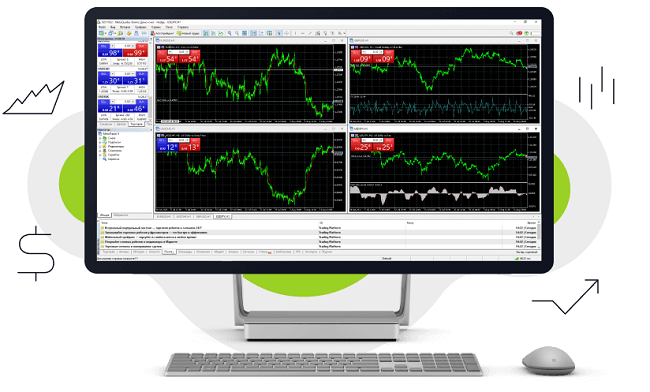
MetaTrader 5 is not just an upgrade to MT4 — it’s a complete trading ecosystem. Whether you’re a manual trader who relies on technical analysis, an algorithmic trader building automated systems, or someone who wants to diversify across multiple asset classes, MT5 has the tools to support your goals.
In the next article of this series, we’ll walk you through how to download and install MT5 step by step, and how to set up your first demo account so you can start exploring the platform risk-free.
Next up: How to Download, Install, and Set Up MetaTrader 5 →

I am Raúl Canessa, the founder of Forexdominion.com. As an experienced Forex trader, my passion for investing and algorithmic trading has shaped my professional journey. Over the years, I have dedicated myself to refining my skills in the financial markets, allowing me to share my knowledge and insights through my platform. I am committed to helping others understand the world of trading and develop effective strategies for success in this exciting field.